📘 TextWhisper Features
- Logged-in user shown in top-right menu
- URL reflects selected user or list token, and item — updates dynamically when browsing or sharing
- User avatars displayed next to usernames in user lists and chat messages for better visual identification.
- Strong password requirements (A–Z, a–z, 0–9, minimum 6 chars)
- Email confirmation required before login
- Disposable email domains blocked during registration
- Display name validation with anti-spam filters (no gibberish, reserved words, excessive repetition)
- Client-side and server-side input validation for consistency
- Each list has a privacy level that controls who can access it:
- 🌐 Public – open and searchable by anyone
- 🔒 Private – visible only to you and invited list-chat members
- 🕵️ Secret – hidden from search, but shareable via private link
- Privacy affects list visibility, chat access, and who can view or join
- You can change a list’s privacy setting anytime from the list menu
- Only owners or admins can invite others or adjust privacy
- All chats are end-to-end encrypted. Only users with list-chat access can read them.
- Create, rename, reorder, and delete lists
- Add/remove items from lists (yours or others')
- Mark lists as Public or Private
- Favorite lists for quick access
- Item actions: add to list, attach PDF, remove
- List actions: offline access, add to My Lists, rename, delete
- Real-time chat scoped to each list
- Floating chat icon (mobile/desktop-aware) or footer toggle
- Displays messages with emoji and multi-line formatting
- Supports invite-only list participation
- Owners, Admins and editors can invite members via email
- Role system: Viewer, Commenter, Editor, Admin, Paused
- Invite UI integrated in chat panel with inline role editing
- Access control enforced server-side for chat visibility and modification
- Unread message count shown per list
- Clickable badge opens the chat directly from the list
- Only invited members can see or send messages for a list
- Smart menu to select unread list chats (shown when clicking chat tab with unread)
- Unread chat selector shows per-list unread counts and current list (if not already listed)
- Chat selection clears unread state automatically (badge + backend timestamp)
- Chat auto-scroll and "new messages" indicator work seamlessly
- Push notifications triggered by messages containing ! or 🔔
- Push includes list name as title, respects sound + visibility settings
- Only subscribed and invited users receive pushes
- User avatars shown inline with chat messages
- Timestamps displayed above each chat message bubble
- All chats are end-to-end encrypted
- Sidebar tabs: Lists / Users
- Search box filters users/lists/items
- Sidebar auto-collapses on small screens
- Floating ⋮ toggle button (mobile)
- Unified sidebar toggle across header, footer, and floating button
- Sidebar toggle preserves the current tab
- Share Group action available in sidebar group menus
- Event Groups (with members) and Categories (label-only classification)
- Category settings with custom color selection
- Create recurring events per group
- Member/admin check-in and check-out
- Attendance reports with filters (period, group, category)
- Built-in event polls: create, vote, and share in chat
- Owner and user annotations supported (two overlays)
- Hover or tap annotation to see who is the owner
- Scroll and zoom while drawing or viewing
- Annotations persist across sessions and offline use
- Draw with mouse, finger, or stylus using pointer events
- Pinch-to-zoom with consistent panning support
- Line width adjusts non-linearly with zoom for visual stability
- Base annotation overlay per owner or admin
- Additional annotation overlay per user
- Double-tap edges to switch to next/previous item
- Smart margin detection automatically reduces large white borders for a cleaner view
- Optimized screen usage — PDFs expand to fill available space, especially on tablets
- Adaptive zoom levels based on detected text area
- Configurable navigation arrows for Continuous and Paged view modes
- Continuous view: page up/down via arrows
- Paged view: previous/next page via arrows
- Boundary navigation to previous/next item (PDF) in the list
- Pen tool (uses color picker)
- Highlighter tool draws straight lines, uses same color picker (avoids black)
- Eraser tool (freehand erase)
- Undo last annotation
- Clear all annotations
- Save annotations
- Reload annotations
- Print with annotations included
- Print PDFs with annotations included
- Uses subject as suggested file name
- PDFs stored per item and loaded on demand
- Drag-and-drop PDF upload with automatic replacement
- PDF File upload from PC or device
- Support for pasting direct PDF URLs
- PDF IMSLP search, autofills from text subject
- Mobile-safe upload button fallback
- Swipe left/right (in center of screen, one finger) to go to next/previous item
- Works globally when not in edit mode
- Double-tap screen edges (PDF view) also navigates between items
- Edit mode for owners and admins
- Rich text tools: Bold, Italic, Underline
- Dual textareas (editable + trimmed preview on wide screens)
- Slider to adjust text trim level
- New, Save, Refresh, Delete, and Print controls
- Smarter HTML-based editor for stable formatting
- Toolbar visibility synced with edit mode and the Text tab
- Shows owner and last editor
- Edit history is stored
- Available to all logged-in users (private to each user)
- Highlight text selections with color options
- Add comments in draggable bubble markers
- Freehand drawing directly on the text
- Drawings appear in movable bubbles anchored to the correct word
- Unified Undo for highlights, comments, and drawings
- Accurate touch selection and smooth mobile drawing
- Annotations save automatically and restore when reopening items
- Text stays unchanged — annotations float safely above it
- Add music via drag-and-drop or by pasting links in the Music panel
- Add music from This device, cloud imports, and supported links
- Upload your own MIDI, MP3, WAV, FLAC, or M4A files per item for in-browser playback
- Paste links from YouTube, Spotify, and Soundslice — embedded players appear automatically
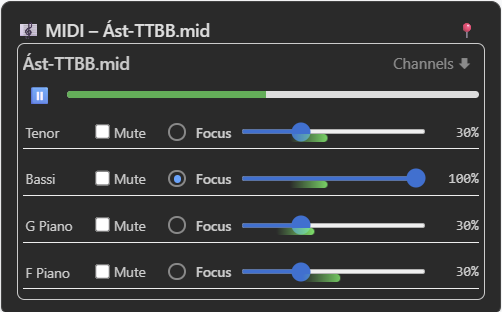
- Supports built-in MIDI player with channel mute, solo (focus), per-channel volume, and editable names
- MIDI player shows real-time activity pulses and supports seeking via progress bar
- Channel names are editable and saved per file for consistent labeling
- Native HTML5 audio player used for supported audio formats
- Pin any player (YouTube, Spotify, MIDI, audio) to float outside the panel for focused playback
- Floating players are draggable and mobile-aware — reposition with drag or long-press
- Playback continues uninterrupted when collapsing or pinning/unpinning the player
- Only one pinned player is active at a time — auto-unpins or restores as needed
- Delete uploaded music files if you are the item owner or an admin
- Soundslice links also open fullscreen or in-app (mobile-aware)
- Footer music button toggles the Music panel and adapts behavior to platform
- Loop playback: repeat the same track or automatically move to the next item
- Set a default audio or MIDI file per item for playlist-style looping
- Loop mode selector directly in the audio player (no loop / repeat track / loop list)
- Player controls fully usable in pinned mode (progress, speed, skip, loop)
- Pinned player stays active while navigating — draggable on desktop and mobile
- Cleaner right-aligned controls with pin and default checkmark
- Home, Logged in as..., Login/Logout
- Edit Mode toggle
- About, Version, App Reset
- Signed-in avatar indicates active identity/context
- Works as a Progressive Web App (PWA) — installable like a native app on mobile or desktop
- Offline access for marked lists: view text, PDFs, and annotations without internet
- Service Worker caches the app shell, list metadata, PDFs, and drawing data
- List viewer supports offline loading with a refresh fallback if partially cached
- Version-aware cache invalidation with automatic background updates
- Offline indicator banner shows when no connection is detected
- URL updates dynamically as user switches lists or items
- Direct links to
/token/surrogate open exact content
- Sidebar state (tab, scroll, expanded/collapsed groups) persists
- Soundslice tab launches fullscreen or app depending on device
- Share lists:
https://textwhisper.com/{token}
- Share items:
https://textwhisper.com/{token}/{surrogate}
- Supports usernames and list tokens in URLs
- Accessible via list and item menus (⋮ → Share this list/item)
- Opens native share options: copy link, Nearby Share, Messages, Mail, Facebook, Chat, and more (based on your device)
- Meta tags for rich previews on social and chat apps
- Works with offline lists too
- "My Friends" view shows all distinct chat-connected users across your lists
- "List Chat Members" allows lazy-loaded viewing of participants per list, including roles and invited users
- Session-based authentication
- Ownership-validated inserts, edits, deletes
- Private lists are hidden from search/guests
- Public content accessible without login
- Optional “Stay logged in” with secure persistent cookie
- ✏️ Unified Text Annotation System — highlights, comments, and drawings now share the same engine
- 🖍️ Freehand drawing on text with accurate anchoring to the correct words
- 🫧 Movable drawing bubbles with stable positions and automatic re-anchoring on text changes
- ✒️ New highlight engine — smoother selection, no duplicated text, better removal
- 💬 Improved comment bubbles — cleaner editing, stable offsets, full undo of moves and text changes
- ↩️ Unified Undo System — undo highlights, comments, drawings, and text edits
- 🖐️ Touch improvements — accurate highlighting and drawing on phones and tablets
- 🎨 New drawing palette with color pickers for pen, highlighter, and draw tools
- 🅱️ Rich text formatting added: Bold, Italic, Underline
- 🔧 New HTML-based text editor replacing old plain-text engine for stability and precision
- 🔄 Refresh action now resets both text and drawing canvas, respecting active tools
- 🧠 Edit mode permissions tightened — only owners/admins can edit text; all users can annotate privately
- 🧲 More consistent tool state syncing between text mode, draw mode, and palette buttons
- 🎵 New audio loop system — choose between no loop, repeat track, or loop entire list
- 📌 Pinned player enhancements — cleaner UI, stable playback, draggable on all devices
- ⭐ Default music per item — mark one audio or MIDI file as the default for automatic playlist looping
- 🎚️ Fully interactive pinned player — progress bar, speed control, loop mode all work correctly
- 🔍 More precise click-handling — player no longer collapses when adjusting controls
- 🧩 Cleaner control layout — default checkbox aligned next to the pin button for music and MIDI only
- 💾 Persistent defaults — default pinned music stored per item for smart auto-play when looping lists
- 📄 Automatic PDF margin detection — intelligently trims large white page borders for cleaner, space-efficient reading
- 📱 Tablet-optimized view — maximizes content area so PDFs fill the screen instead of wasting space on margins
- 🔍 Smarter zoom behavior — auto-adjusts zoom levels based on detected text region, no manual fine-tuning needed
- ⚡ Faster page rendering — margin detection now uses optimized pixel scanning for quicker load times
- 🖥️ Consistent layout across devices — ensures PDFs look balanced on phones, tablets, and desktops
- 💬 List-based chat: one chat per list, visible only to invited members
- 👥 Inline member invite interface with role control: Viewer, Commenter, Editor, Admin, Paused
- ➕ Member management is fully integrated into the chat panel UI
- 📂 Unified sidebar toggle logic across footer, hamburger, and floating button (
window.toggleSidebar())
- 🧭 Footer navigation bar with tab switching, fullscreen toggle, chat toggle, and Soundslice integration
- 📺 Fullscreen mode via footer button, including support for iOS Safari scroll hack
- 💬 Footer-based chat toggle replaces floating bubble, fixes overlap and maintains state
- 🎨 Edit mode toolbar logic synced across tab switches (text and PDF)
- 🧠 Sidebar toggle and item selection preserve the current active tab
- 🛡️ Registration hardened with client+server display name validation
- 📛 Display names must be 3–30 chars and reject gibberish, repetition, and reserved words
- 🚫 Disposable email addresses are now blocked at signup
- 🖍️ New zoomable canvas with stylus/touchpad/finger drawing support
- 📐 Smart line scaling: stroke thickness remains visually stable at any zoom level
- 📄 PDF annotation tools improved with eraser, box erase, and undo
- 📤 Drag-and-drop PDF upload replaces old version and updates cache
- 📴 Enhanced offline support with version-aware Service Worker caching
- 🔐 Fully redesigned login system with session + persistent token support
- 🧼 Automatic cleanup of duplicate session tokens per browser/device
- 📲 Login sessions display OS, browser, and device type in plain English
- 🗑️ Logout panel with option to revoke specific sessions or all devices
- 🟢 Active session is visually highlighted ("This browser") and non-revocable
- 🛑 Session versioning prevents reuse after remote logout
- 🔁 Persistent tokens auto-renew upon reuse (rotation + expiry refresh)
- 🧼 Box eraser with live preview overlay (dashed rectangle)
- 🧠 Undo stack per page for annotation edits
- ✏️ Stylus, finger, and touchpad drawing supported across platforms
- 📄 Annotations saved per page and persist across sessions
- 📉 Smart zoom & pan support while drawing (touch-action tuning)
- 🕊️ Missing annotation files return silently — avoids error logging
- ⚡ Fast overlay rendering even without existing annotations
- 📱 Scroll-to-bottom bug fixed on long PDFs
- 📏 Line width auto-scales with zoom for better visual consistency
- 🧭 Sidebar auto-collapses on iPads in portrait mode
- 👓 Dual textarea display enabled for screens wider than 1000px
- 📝 In edit mode, original (readonly) textarea auto-hides
- 🔁 Sidebar and tab state preserved across navigation
- 🛡️ Role-based drawing control (e.g., viewer cannot annotate)
- 🔐 Session-based token management (temporary vs persistent) now unified
- 🧠 Logout preserves referrer logic — returns to current list or root
- 📛 Improved session labeling: includes IP, device type, and expiration
- 📄 Cleaner device session rendering using parsed User-Agent summary
- 🧩 Revoke session UI grouped and styled consistently with form behavior
- 🔴 Unread message count shown per list — updates in real time
- 🔴 Clickable badge opens the chat directly from the list
- 🔔 'New messages' alert shown in chat when user scrolls up
- 💬 Messages aligned left/right based on sender identity
- 📋 Multi-line messages preserved with proper formatting
- 😊 Emoji insertion via native OS picker
- ✏️ Input area supports Shift+Enter for newlines (desktop)
- ⏳ Auto-scrolls to bottom when new messages arrive (unless scrolled up)
- 🔐 Only invited members can see or send messages for a list
- 🐽 Smart menu to select unread list chats (shown when clicking chat tab with unread)
- 📍 Unread chat selector shows per-list unread counts and current list (if not already listed)
- ✅ Chat selection clears unread state automatically (badge + backend timestamp)
- 🧠 Chat auto-scroll and 'new messages' indicator work seamlessly
- 🔔 Push notifications triggered by messages containing ! or 🔔
- 🔔 Push includes list name as title, respects sound + visibility settings
- 🔔 Only subscribed and invited users receive pushes
- 🎵 MIDI and MP3 file upload supported per item
- 📌 Pin music players (MIDI or MP3) to float outside panel for persistent playback
- 📤 Drag-and-drop music file upload with file type validation and size limits
- 📝 Uploaded audio filenames preserve Icelandic characters (í, æ, ö, etc.)
- 🗑️ Delete buttons for music files (visible to owner/admin only)
- 🔗 Soundslice links supported in text — rendered in Music tab automatically
- 📥 Pinned music players auto-close when switching away from Music tab
- 📺 YouTube links now render embedded video players in the Music panel
- 📌 Floating player logic extended to YouTube, Spotify, MIDI, and audio embeds
- 🧠 Music panel parses and displays multiple link types with correct player format
- 🎛️ Built-in MIDI player redesigned with channel mute, solo (focus), volume sliders, and editable names
- 🌈 Real-time channel activity pulse visualizations in MIDI player
- 📝 Channel names are preserved between sessions using metadata storage
- 🎚️ MIDI progress bar supports interactive seeking
- 📍 Pinning/unpinning or collapsing players no longer interrupts playback
- 🔐 All chats are end-to-end encrypted. Only users with list access can read them.
- 👥 User avatars displayed next to usernames in user lists
- 💬 User avatars shown inline with chat messages
- 💬 Timestamps displayed above each chat message bubble
- 👥 “My Friends” view shows all distinct chat-connected users across your lists
- 👥 “List Chat Members” allows lazy-loaded viewing of participants per list, including roles and invited users
- 🔗 Share option added to list and item menus, with support for native app sharing and rich previews
- 📄 'No PDF found' screen redesigned with consistent layout and permission-aware options
- 📥 In addition to drag/drop and file upload, added support for pasting direct PDF URLs
- 🔍 IMSLP search autofills from text subject and reuses a single browser tab
- Secret list tokens (no login sharing)
- Expiring share tokens
- Public list discovery/search
- Market mode for selling contributions
- User-specific annotation layers
- Auto-optimize scanned PDFs (readability + size)
- Import from IMSLP or public sources (curated, with metadata)
- Music-sharing hub (public domain sheet music)